13. FAQs
13.1. How to get started?
To start using TEI Lex-0, you need an XML-aware text edtior and the Lex-0 schema. The most commonly used schema is RelaxNG, and the most popular XML editor for working with TEI files is oXygen. The following instructions assume you have installed oXygen on your system:
- In oXygen XML Editor: associate your TEI document with the current Relax NG schema
https://lex-0.org/schema/lex-0.rngusing the Schema Association dialog (Document > Schema > Associate Schema, or the red-pin icon).Figure 2: Associating schema in oXygen XML Editor![]()
- Manually: include processing instructions at the top of your TEI file:
<?xml version="1.0" encoding="UTF-8"?>
<?xml-model href="https://lex-0.org/schema/lex-0.rng" type="application/xml" schematypens="http://relaxng.org/ns/structure/1.0"?>
<TEI xmlns="http://www.tei-c.org/ns/1.0">
<!--etc.-->
</TEI>
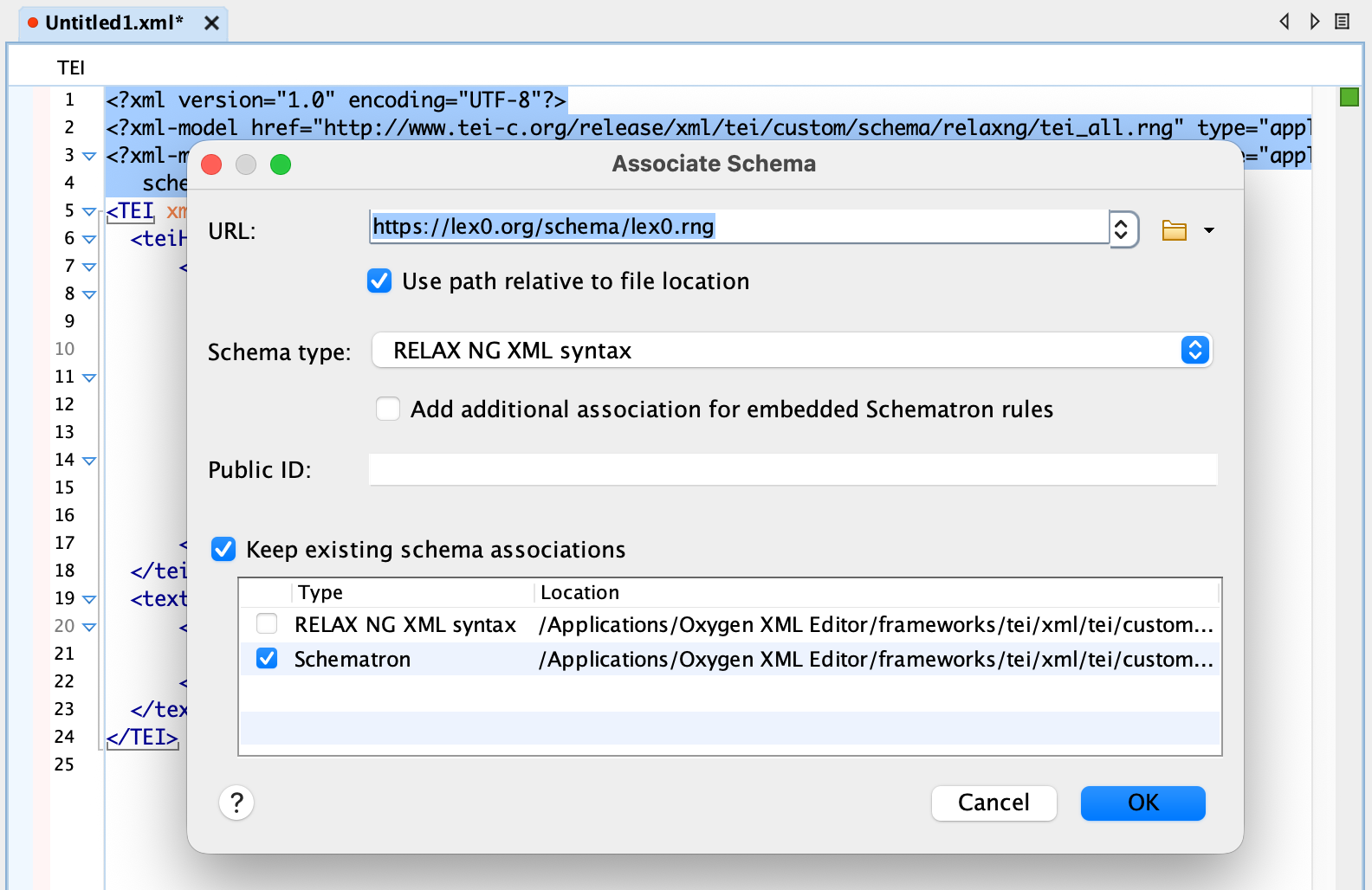
Once you associate the schema, you'll be able to validate your TEI Lex-0 files from inside your editor.
13.2. Why TEI Lex-0?
In the digital age, lexicographers increasingly rely on structured, machine-readable formats to create, analyze, and publish dictionaries (Fellbaum 2014). This shift in lexicographic practice requires not only access to digital content, but a method for representing the internal structure of dictionary entries in a way that computers can process. This is important because computers, unlike humans, cannot intuitively “see” the difference between, say, a word form and its grammatical label: without additional markup, a dictionary entry is just a block of undifferentiated text strings. With consistent markup (Lemnitzer et al. 2013), however, each component of a dictionary entry — such as headwords, pronunciations, parts of speech, definitions, usage notes, and examples — can be explicitly identified and semantically distinguished. This enables a wide range of computational processes, from advanced search and filtering to automated analysis, visualization, and integration with other linguistic resources.
TEI Lex-0 addresses the need for structured lexical data by providing a technical specification and a set of community-recommended guidelines for encoding, i.e. marking up, machine-readable dictionaries. In essence, it is a strict customization of the Guidelines of the Text Encoding Initiative (TEI Consortium 2025), delivered as a constrained TEI schema that prioritizes uniformity and simplicity. It consists of a vocabulary (i.e. a set of XML elements and attributes) that can be used to markup parts of the dictionary (<entry>, <form>, <sense>, <def> etc.) and a grammar, i.e. a set of rules on how to combine individual elements into valid dictionary entries. Using an XML text editor that supports validation mechanisms, a user can ensure that their dictionary conforms to the TEI Lex-0 specification, catching errors or inconsistencies during the encoding process. This validation step helps maintain structural integrity and semantic clarity across entries.
13.3. Lex-0 vs. TEI P5?
TEI Lex-0 is not a separate markup language from TEI. It is a profile / customization of TEI P5 (the broader TEI Guidelines). TEI P5 provides a very large vocabulary designed to cover many text types (manuscripts, drama, correspondence, dictionaries, and more). Lex-0 builds on that foundation by:
- selecting a dictionary-focused subset of TEI P5,
- clarifying preferred and discouraged patterns where TEI P5 offers multiple possibilities, and
- (where possible) constraining choices to improve interoperability between dictionary projects.
A practical consequence is that an element can exist in TEI P5 (such as <superEntry> or <pos>, for instance) but be out of scope or constrained differently in TEI Lex-0. If you already know TEI P5, you can simply treat the Lex-0 Specification as the authoritative reference for what is “allowed and expected” when you want Lex-0–conformant dictionary data.
Lex-0 should not be thought of as a replacement of the Dictionaries Chapter in the TEI Guidelines or as the format that must be necessarily used for editing or managing individual resources, especially in those projects and/or institutions that already have established workflows based on their own flavors of TEI. Lex-0 should be primarily seen as a format that existing TEI dictionaries can be unequivocally transformed to in order to be queried, visualised, or mined in a uniform way.
At the same time, however, Lex-0 can be used both as a best-practice example in educational settings and as a foundation for new TEI-based projects. This is especially true considering the fact that Lex-0 aims to to stay as aligned as possible with the TEI subset developed in conjunction with the revision of the ISO LMF (Lexical Markup Framework) standard (cf. Romary 2015)
13.4. Have a question?
TEI Lex-0 is a community-based project. If you have a question or need help encoding lexicographic data using TEI Lex-0, get in touch using our issue tracker here on GitHub.
13.5. How to contribute?
More advanced users can propose solutions by submitting pull requests. Make sure you understand the internal nitty-gritty as well as our GitHub workflow.
13.5.1. The internal nitty-gritty
lex-0.oddis the master ODD file. It uses<xi:include>to pull chapter fragments fromodd/includes/.- Examples of TEI Lex-0 live in
odd/examples/examples.xml; the stripped counterpart isodd/examples/examples.stripped.xml. - The Relax NG schema generated from the ODD is written to
build/html/schema/lex-0.rng. xslt/tei-stripper.xslstrips TEI examples into thehttp://www.tei-c.org/ns/Examplesnamespace so they can be included inside <egXML>. The stripping is run by the XProc pipeline inxproc/lex-0.xpl(invoked bynpm run assets:oddfrom the repository root).- To include validated examples, reference ids from the stripped file, for example:
You can also include segments using the<egXML xmlns="http://www.tei-c.org/ns/Examples"><xi:include href="../examples/examples.stripped.xml" corresp="../examples/examples.xml" xpointer="SJ.GDEL"/></egXML>element()scheme, e.g.<egXML xmlns="http://www.tei-c.org/ns/Examples"> <xi:include href="../examples/examples.stripped.xml" corresp="../examples/examples.xml" xpointer="element(MZ.RGJS.сејче/4/1)"/></egXML> - If you are using oXygen XML, clicking on the link in Author Mode will take you directly to the element or fragment in
odd/examples/examples.xmlfor editing. - After changing
odd/examples/examples.xml, runnpm run assets:oddto regenerate the stripped examples and the HTML output.
13.5.2. GitHub Workflow
Before proposing changes to the TEI Lex-0 specification or narrative guidelines, make sure:
- you have gathered feedback or confirmed the need for the change using our GitHub issues
- you understand how the source files are organized and how the guidelines and RNG schema are generated from the ODD
Workflow overview (using forks):
- fork the Lex-0 repository on GitHub and clone your fork locally; your fork is the origin, the main repository is upstream
- keep your local
devup to date by fetching from upstream and fast-forwarding your local branch before starting new work - create a feature branch from
devand name it appropriately for the given task (e.g.fix-attr-values-on-sense) - make your changes in that branch (specification, examples, or narrative text), then commit and push to your fork
- once you are satisfied with the changes you made, open a pull request from your feature branch into upstream
dev, summarizing the change and linking to the relevant issue - if editors request adjustments, keep working in the same branch and push new commits; the PR will update automatically
- after the PR is merged, delete the feature branch and sync your fork’s
devwith upstream again
13.6. Convert from Lex-0 to Ontolex-Lemon?
Funny you should ask, because we have exactly what you're looking for. Check out the tei2ontolex stylesheet.
13.7. How to cite these guidelines
Full citationToma Tasovac, Laurent Romary, Piotr Bański, Veronika Engler, Axel Herold, Fahad Kahn, Boris Lehečka, Charly Moerth, Ana Salgado, Daniel Schopper and Kinga Sramó. 2026. TEI Lex-0: A baseline encoding for lexicographic data. Version 0.9.5. DARIAH Working Group on Lexical Resources. https://lex-0.org.
Short citationToma Tasovac, Laurent Romary et al. 2026. TEI Lex-0: A baseline encoding for lexicographic data. Version 0.9.5. DARIAH Working Group on Lexical Resources. https://lex-0.org.